 Twinread
Bilingual web page translation: read any page in two languages
Updated
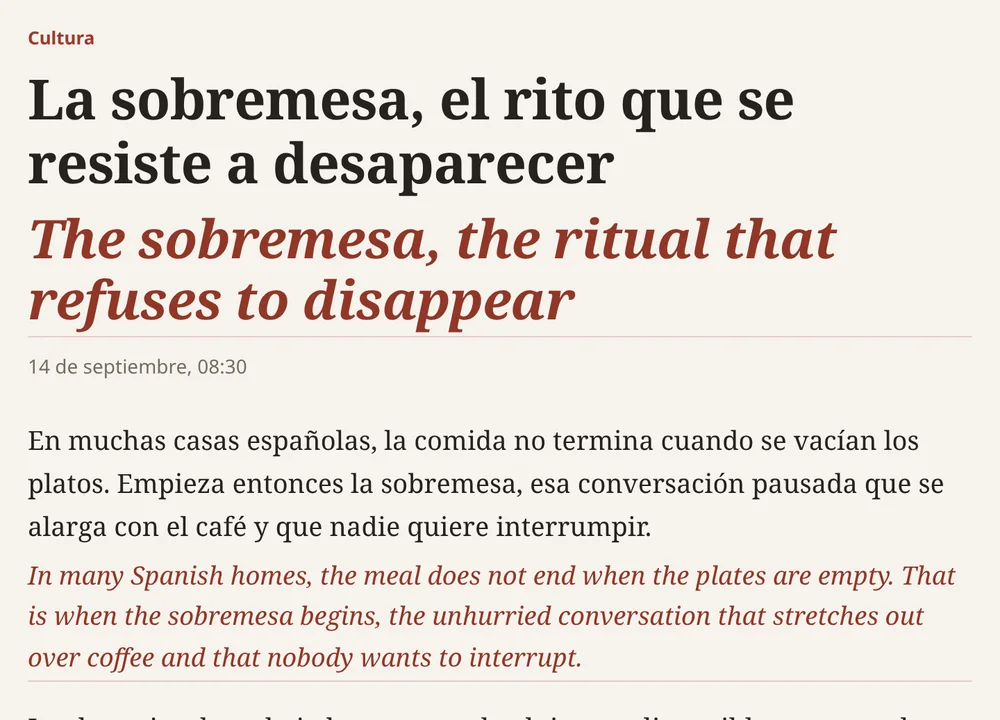
Bilingual web page translation keeps the original text on the page and adds the translation next to it. It suits two kinds of reading: getting through a page in a language you do not read well, and studying a language you are learning. Twinread does it in Chrome and Edge, with the translation under each paragraph.
Google Chrome 138 or later, or a Chromium browser with the built-in Translator API, on desktop. No account, no API key.
Why read both languages
A page that shows only the translation tells you what a text says, but not how it says it. When the original stays visible, you can check a phrase against its translation, see how a word is used, and read the original alone once you understand enough. For learners, real news, blogs and documentation are more interesting than textbook sentences, and the translation is there when you get stuck.
What you need
- Google Chrome 138 or later, on desktop, or a Chromium-based browser that ships the built-in Translator API (verified in Chromium 153; it fetches its engine on first use, about 20 seconds). Chrome's translator does not work on mobile.
- An https page. Chrome turns its translator on for https pages only.
- A language pair Chrome can translate on your device. Twinread's menus list 39 languages: Arabic, Bengali, Bulgarian, Chinese, Chinese (Traditional), Croatian, Czech, Danish, Dutch, English, Finnish, French, German, Greek, Hebrew, Hindi, Hungarian, Indonesian, Italian, Japanese, Kannada, Korean, Lithuanian, Marathi, Norwegian, Polish, Portuguese, Romanian, Russian, Slovak, Slovenian, Spanish, Swedish, Tamil, Telugu, Thai, Turkish, Ukrainian and Vietnamese. A menu is not a promise. Chrome decides for each pair when you use it, and Twinread tells you if it cannot translate a pair.
- A one-time download. Chrome fetches a small language model the first time you use a pair. After that, translation works without a connection.
Read a page in two languages
- Install Twinread. On the welcome page, choose the two languages and download the language model.
- Open a page in the other language. Twinread detects the page language, and you can set it by hand in the popup.
- Press Alt+A, or open the toolbar popup and press "Translate this page".
- Choose Bilingual in the popup or in the bar at the bottom right. Choose Translation only to replace the original.
- Press Alt+A again, or Show original, to get the untouched page back.
Using it to learn a language
- Read the original first. Pick the Subtle look so the translation is quieter, and glance down only when you are stuck.
- Translate one paragraph. Hold Alt over a paragraph to translate just that one and leave the rest in the original.
- Keep sentences. Select a sentence to get a card with its translation and a copy button, then paste it into your notes or flashcards.
- Read twice. Use Translation only for a fast first read, then switch to Bilingual for a second pass. Nothing is translated again.
- Turn the pair around. The swap button reverses the languages, so a page in your own language can be shown with the language you are learning.
- Follow a site every day. Free translates every site you choose as it loads. Chrome asks for access to one site at a time.
Limits to know
- It is machine translation. Treat it as a reading aid, not a reference.
- There is one engine, Chrome's. You cannot switch to another service or an AI model.
- Code, forms, editable areas, hidden text and one-word menu labels are left alone, and text already in your language is skipped.
- On web pages, it leaves Chrome's own pages, the Web Store and the built-in PDF viewer alone. PDFs open in Twinread's own reader instead.
Free or Pro
Translating pages, selections and paragraphs is free, in both views and all four looks, with no limit on pages or length. Always-translate works on as many sites as you like, free. Free also covers whole PDFs and bilingual video subtitles for the first 10 minutes of each video. Pro translates whole videos and keeps unlimited phrases. 7 days of Pro, free. Then it is €24 for 6 months, €39 for a year or €79 for Pro forever. See the pricing.
Read the next page in two languages
Twinread is free. Chrome does the translating on your computer by default, so the text stays there.
Google Chrome 138 or later, or a Chromium browser with the built-in Translator API, on desktop. No account, no API key.