 Twinread
Immersive Translate alternative: free and private bilingual translation
Updated
Twinread does one thing Immersive Translate does: it shows a web page in two languages, with the translation under each paragraph. The difference is where the translating happens. Twinread hands the text to the translator built into Chrome, so it runs on your computer, with no account. Immersive Translate does a lot more, and this guide says where.
Google Chrome 138 or later, or a Chromium browser with the built-in Translator API, on desktop. No account, no API key needed.
Which one to pick
Pick Twinread if you read web pages in Chrome or Edge on a desktop, want the text to stay on your computer by default, and want translation with no account and no limit on pages or length.
Pick Immersive Translate if you want to choose between AI models and translation services, translate scanned PDFs or ePub, use Firefox or Safari, or read on a phone.
The two side by side
| Topic | Twinread | Immersive Translate |
|---|---|---|
| Where the text goes | Chrome's built-in translator, on your computer, unless you choose your own DeepL or OpenAI-compatible provider for a language pair. Twinread has no translation server. | To the translation engine you select, according to its privacy policy. |
| Account | None. No account and no API key. | Optional for free use. Registering raises the daily quota. |
| Limits | No limit on pages or length. | Free use has a daily limit on translation requests. |
| Price | Free. Optional Pro: €24 for 6 months, €39 for a year or €79 for Pro forever. | A free tier and paid plans, which you cancel on a billing page. Prices are on its pricing page. |
| Engines | Chrome's built-in translator, plus your own DeepL key or OpenAI-compatible endpoint, set per language pair. | Over 20, including ChatGPT, DeepL, DeepSeek and Gemini. |
| Languages | 39 in the menus. Chrome decides which pairs it can translate on your device. | More than 100 language pairs. |
| PDFs and video | Subtitles where the site provides captions (HTML5 video, YouTube) and PDFs that contain text, with no OCR. No ePub. Your own .srt and .vtt files work. | ePub and scanned PDFs, and bilingual subtitles on video sites. |
| Browsers | Google Chrome 138 or later and Microsoft Edge 148 or later, desktop only. | Chrome, Edge, Firefox and Safari, plus iOS and Android. |
Immersive Translate details come from its home page (immersivetranslate.com/en/), pricing page (immersivetranslate.com/en/pricing/) and privacy policy (immersivetranslate.com/docs/PRIVACY/), read in September 2026. Its terms change, so check them before you decide.
Where the text goes
A translation extension has to read the text it translates, so the question is what happens next. In Twinread the text goes from the page to Chrome's translator, which runs on your computer, and the result comes back to the page. Twinread itself sends only your licence key anywhere, when a Pro pass is activated or checked. If you save your own DeepL key or an OpenAI-compatible endpoint and choose it for a language pair, the text being translated for that pair goes from your browser to that provider, with your key.
Immersive Translate lets you pick an engine, and its privacy policy says: "When using webpage translation, your translation content will only be sent to the translation engine you select." So a translation service or an AI model receives the text you translate. That is how a multi-engine tool works, and the policy says it plainly. The safety guide goes through it line by line.
Limits, account and price
Twinread's free plan translates pages, selections and single paragraphs, in both display modes, with no limit on pages or length. Always-translate works on as many sites as you like, free. Free includes whole PDFs and bilingual video subtitles for the first 10 minutes of each video. Pro translates whole videos and keeps unlimited phrases. 7 days of Pro, free. After that Pro costs €24 for 6 months, €39 for a year (12 months) or €79 for Pro forever.
Immersive Translate can be used free. Its pricing FAQ says "daily translation requests are subject to a reasonable limit (higher quota after registration)".
Where Immersive Translate is better
- More engines. It lists over 20, including ChatGPT, DeepL, DeepSeek and Gemini. If you want an AI model's phrasing or a particular service, Twinread cannot do that. It has one engine.
- Documents and video. It handles ePub and scanned PDFs, and bilingual subtitles on video sites such as YouTube and Netflix. Twinread covers captions the site provides, not audio, and a PDF reader of its own for PDFs that contain text, with no OCR and no ePub.
- Other browsers and phones. It also runs in Firefox and Safari, and has apps for iOS and Android. Chrome's built-in translator does not work on mobile, so Twinread does not either.
- More language pairs. It lists more than 100.
What Twinread does on a page
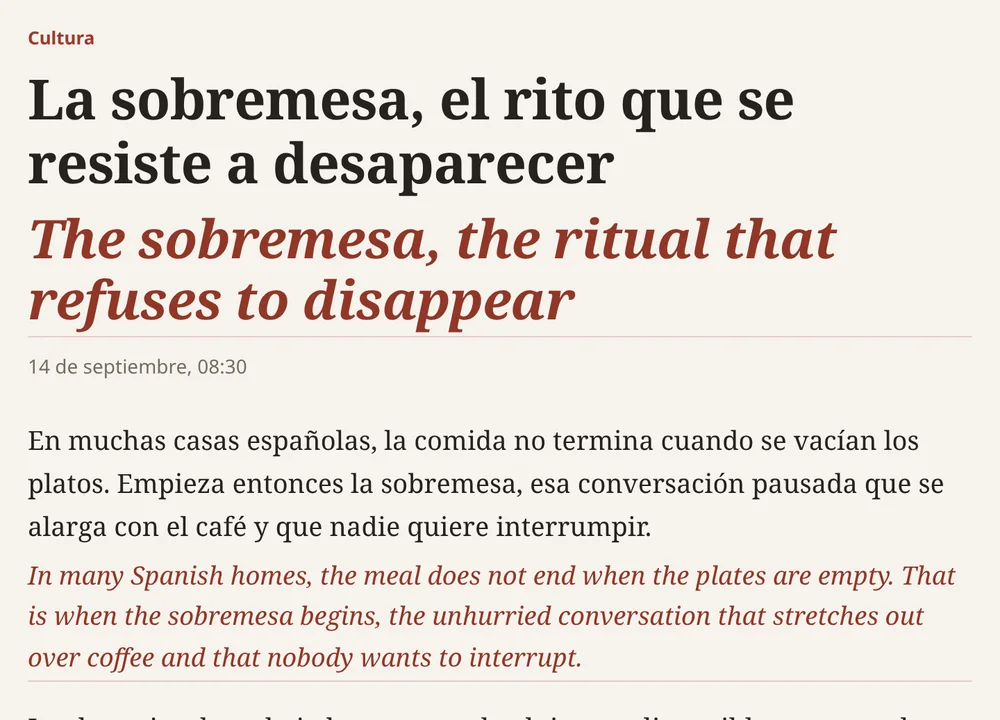
Press Alt+A or the toolbar button. The translation appears under each paragraph and the original stays as it was. A small bar switches between Bilingual, Translation only and Show original without translating again. The side by side guide shows the steps.
Try it
Install Twinread, choose your two languages on the welcome page, and let Chrome download the language model once. After that translation works without a connection.
Read a page in two languages, on your computer
Twinread is free, with no limit on pages or length. Chrome does the translating by default, so the text stays on your computer.
Google Chrome 138 or later, or a Chromium browser with the built-in Translator API, on desktop. No account, no API key needed.
More guides
- Is Immersive Translate safe?
- Side by side translation extension
- Bilingual web page translation
- All guides
Twinread is an independent product and is not affiliated with Immersive Translate.